Product Recommendations (Amazon Product)
This tutorial demonstrates how to configure a recommendation engine using the Amazon Product dataset. The dataset contains product reviews from Amazon.com. This example uses the Postgres connector, but the same approach applies to other supported data stores.
Data Preparation
The complete Amazon dataset contains 82.8 million reviews, 9.35 million products, and 20.98 million users. This tutorial uses the 'Beauty' category subset (371k reviews) to reduce processing time. This subset is commonly used in recommendation systems research.
Download the dataset
Download the Beauty rating subset and product metadata:
# Beauty ratings.
curl -L -O "https://huggingface.co/datasets/McAuley-Lab/Amazon-Reviews-2023/resolve/main/raw/review_categories/All_Beauty.jsonl"

# Beauty product metadata.
curl -L -O "https://huggingface.co/datasets/McAuley-Lab/Amazon-Reviews-2023/resolve/main/raw/meta_categories/meta_All_Beauty.jsonl"
The data is stored in JSONL format. Load and inspect it:
import pandas as pd

events_df = pd.read_json('All_Beauty.jsonl', lines=True)
products_df = pd.read_json('meta_All_Beauty.jsonl', lines=True)

display(events_df.head())
display(products_df.head())
events_df

products_df
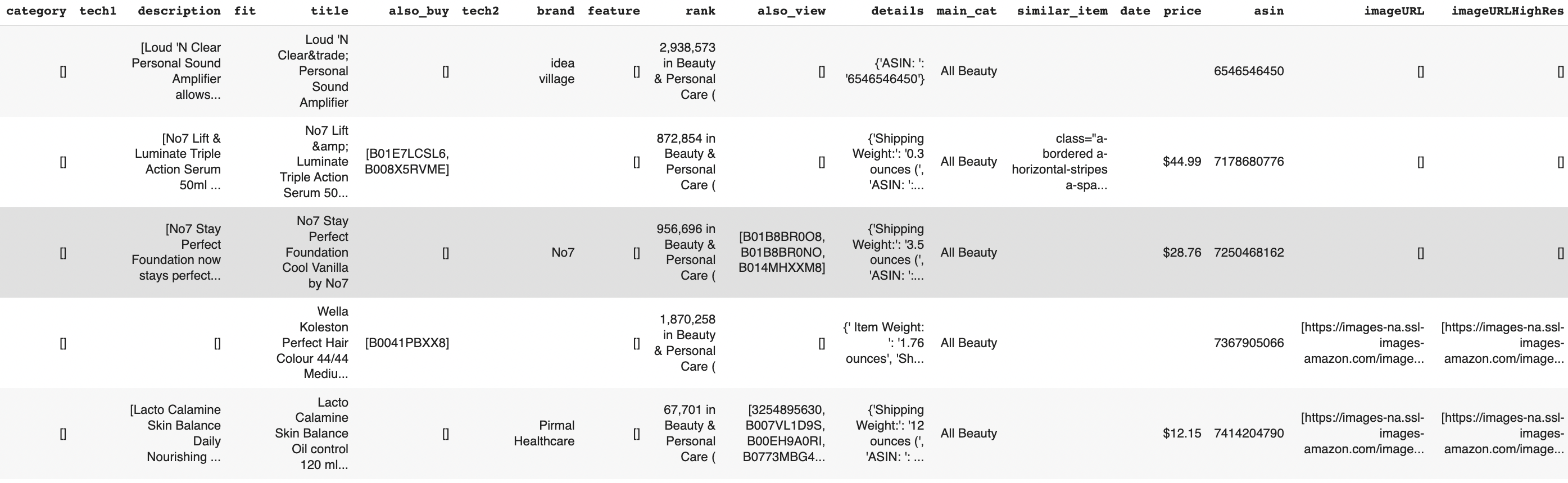
The data contains some inconsistencies: prices include '$' symbols, and some fields have empty strings or malformed HTML. These can be handled during data ingestion.
Required columns
The minimum required columns for an interaction table are:
user_id: User identifieritem_id: Item identifierlabel: Interaction label (e.g., rating, click)created_at: Timestamp
If user or item tables are provided, their ID columns must be aliased to user_id and item_id.
Column mapping
Interaction data (events_df):
reviewerID: User identifierasin: Product identifier (used asitem_id)overall: Review ratingunixReviewTime: Review timestamp
Item data (products_df):
asin: Product identifiertitle: Product nameprice: Price in US dollarsbrand: Product brand
CLI Setup
Install the CLI
pip install shaped
Shaped supports Python 3.8 to 3.11. See installation instructions if you need to install pip.
Initialize the CLI
shaped init --api-key <YOUR_API_KEY>
If you don't have an API key, see How to get an API key.
Create tables
Create tables for ratings and product metadata using create-table-from-uri:
shaped create-table-from-uri --name amazon_beauty_ratings --type json --path ./All_Beauty.jsonl
shaped create-table-from-uri --name amazon_beauty_products --type json --path ./meta_All_Beauty.jsonl
Create the engine
Define the engine configuration:
data:
  item_table:
    type: query
    query: |
      SELECT
        asin AS item_id,
        title,
        TRY_CAST(TRIM(price, '$') AS DOUBLE) AS price,
        brand
      FROM amazon_beauty_products
  interaction_table:
    type: query
    query: |
      SELECT
        CASE
          WHEN overall >= 4 THEN 1
          ELSE 0
        END as label,
        asin AS item_id,
        reviewerID AS user_id,
        unixReviewTime AS created_at,
        summary,
        verified
      FROM amazon_beauty_ratings
training:
  models:
    - name: als
      policy_type: als
By default, if not specified, the engine's training schedule is set to @once.
To enable daily retraining, add the following to your training configuration:
training:
  schedule: '@daily'
  models:
    - name: als
      policy_type: als
Create the engine:
shaped create-engine --file amazon_beauty_product_recommendation.yaml
Monitor engine status
Engine creation and training can take several hours, depending on data volume and attributes. Check status using the CLI:
shaped list-engines
Response:
[
    "engines": {
        "created_at": "2024-01-18T19:17:51 UTC",
        "engine_name": "amazon_beauty_product_recommendations",
        "engine_uri": "https://api.shaped.ai/v2/engines/amazon_beauty_product_recommendations",
        "status": "FETCHING",
    }
]
The engine progresses through these stages:
SCHEDULINGFETCHINGTRAININGDEPLOYINGACTIVE
Once the status is ACTIVE, the engine is ready for queries.
Query recommendations
Query recommendations using the Query endpoint. Provide a user_id and the number of results to return.
Using the CLI:
shaped query --engine-name amazon_beauty_product_recommendations \
  --query "SELECT * FROM similarity(embedding_ref='als', limit=50, encoder='precomputed_user', input_user_id='\$user_id') LIMIT 5" \
  --parameters '{"user_id": "AHGHQ5SPYZ60Q"}'
Response:
{
   "results": [
      {
         "id": "0002007770",
         "score": 0.98,
         "attributes": {
            "title": "Compact Hair Dryer",
            "price": 64.99
         }
      },
      {
         "id": "000100039X",
         "score": 0.92,
         "attributes": {
            "title": "Eye Balm",
            "price": 32.0
         }
      },
      {
         "id": "0002051850",
         "score": 0.73,
         "attributes": {
            "title": "Ear and Nose Hair Trimmer",
            "price": 12.99
         }
      },
      {
         "id": "0002219417",
         "score": 0.69,
         "attributes": {
            "title": "Pure Instinct Perfume",
            "price": 16.95
         }
      },
      {
         "id": "0000031887",
         "score": 0.68,
         "attributes": {
            "title": "Eye Shadow and Eye Liner Pen",
            "price": 15.99
         }
      }
   ]
}
The response contains an array of result objects with item IDs, scores, and metadata.
Using the REST API:
curl https://api.shaped.ai/v2/engines/amazon_beauty_product_recommendations/query \
  -H "x-api-key: <API_KEY>" \
  -H "Content-Type: application/json" \
  -d '{
    "query": "SELECT * FROM similarity(embedding_ref=''als'', limit=50, encoder=''precomputed_user'', input_user_id=''$user_id'') LIMIT 5",
    "parameters": {
      "user_id": "AHGHQ5SPYZ60Q"
    },
    "return_metadata": true
}'
Clean up
Delete the engine when finished:
shaped delete-engine --engine-name amazon_beauty_product_recommendations